Python PDF Generation Guide: Convert Dynamic HTML to PDF in Django
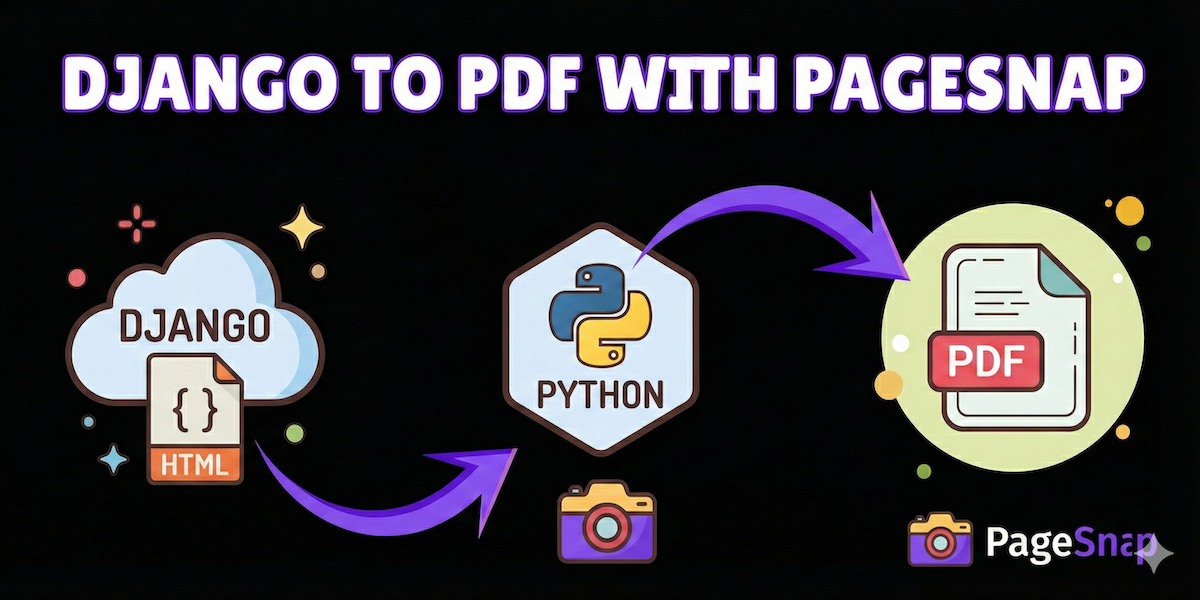
If you’re running a modern web application with Django, you inevitably face the challenge of converting dynamic, user-generated content—like invoices, reports, or contracts—into high-quality, pixel-perfect PDFs.
Relying on old, complicated Python libraries often leads to endless dependency conflicts, poor CSS rendering, and high maintenance costs. The easiest, most reliable solution is to delegate the heavy lifting to a dedicated, Chrome-precision PDF API like PageSnap.
This guide will show you how to integrate the PageSnap API into a simple Django view in just a few steps.
Why Use an API for PDF Generation in Django?
When converting modern HTML (with complex CSS, JavaScript, and dynamic data) to PDF, headless browser engines like Chromium are essential for perfect fidelity.
Using a service like PageSnap means you get:
- Pixel-Perfect Accuracy: Chrome’s rendering engine ensures your PDF output matches exactly what your users see in their browsers.
- Zero Server Overhead: No installing, configuring, or maintaining heavy dependencies (like Puppeteer or Selenium) on your Django server.
- Scalability: PageSnap handles the load, scaling automatically from 1 to 10,000 requests per day without impacting your Django application’s performance.
Step 1: Install the Python requests Library
In your Django environment, the standard library for making HTTP requests is requests.
Bash
pip install requests
Step 2: Create a Dynamic HTML View
For this example, let’s assume you have a function or a simple string representing the dynamic HTML content you need to convert.
In a real-world Django scenario, you would typically use render_to_string to generate HTML from a Django template using context data.
Python
from django.template.loader import render_to_string
from django.http import HttpResponse

def get_dynamic_invoice_html(invoice_id):
    """
    Renders a dynamic Django template to an HTML string.
    """
    context = {
        'invoice_id': invoice_id,
        'customer_name': 'Acme Corp',
        'total_amount': 99.99,
        # ... more dynamic data
    }
    # This assumes you have an 'invoices/invoice.html' template
    html_content = render_to_string('invoices/invoice.html', context)
    return html_content
Step 3: Implement the PageSnap API Call
Now, we’ll create the Django view that takes the dynamic HTML, sends it to the PageSnap API, and streams the resulting PDF back to the user’s browser.
We will use the single request method, which returns the PDF file data directly in the HTTP response.
Python
import requests
from django.http import HttpResponse
from django.views.decorators.http import require_http_methods
from your_app.utils import get_dynamic_invoice_html # Assuming the function above is here

# Replace these with your actual PageSnap credentials
API_USERNAME = 'your_pagesnap_username'
API_PASSWORD = 'your_pagesnap_password'
PAGESNAP_ENDPOINT = 'https://api.pagesnap.co/snap'

@require_http_methods(["GET"])
def generate_pdf_view(request, invoice_id):
    # 1. Generate the dynamic HTML content
    invoice_html = get_dynamic_invoice_html(invoice_id)

    # 2. Prepare the API request payload
    payload = {
        "contents": {
            # Pass your dynamic HTML string here
            "htmls": [invoice_html]
        }
        # Optionally, add 'options' like:
        # "options": {"display_header_footer": True, "format": "A4"}
    }

    # 3. Call the PageSnap API
    try:
        response = requests.post(
            PAGESNAP_ENDPOINT,
            auth=(API_USERNAME, API_PASSWORD),
            json=payload,
            timeout=60 # Set a reasonable timeout for PDF generation
        )
        response.raise_for_status() # Raise exception for bad status codes (4xx or 5xx)
    except requests.exceptions.RequestException as e:
        print(f"PageSnap API Error: {e}")
        return HttpResponse("Error generating PDF.", status=500)

    # 4. Return the PDF to the user
    # The API returns the PDF file data directly for single requests.
    if response.headers.get('Content-Type') == 'application/pdf':
        response_data = HttpResponse(response.content, content_type='application/pdf')

        # Set the filename for the download
        filename = f"invoice_{invoice_id}.pdf"
        response_data['Content-Disposition'] = f'attachment; filename="{filename}"'

        return response_data
    else:
        # Handle cases where the API returns a JSON error response instead of a PDF
        return HttpResponse(f"API failed to return PDF. Response: {response.text}", status=500)
Key Takeaways from the Code
htmlsArray: The core of the request is passing your dynamic HTML string inside the"htmls"array within the"contents"object.- Basic Auth: We use the standard
authparameter inrequests.post()for secure authentication, passing your API username and password. - Headers: The final step is crucial: setting the Django response’s
Content-Typetoapplication/pdfand adding theContent-Dispositionheader forces the browser to download the file with a friendly filename.
With just a few lines of Python, you can leverage a powerful, scalable PDF conversion engine directly from your Django application.